
Read Iceberg on S3 into Polars using AWS Glue Python Shell job (without Pandas!)
Avoid having to use Pandas as an intermediary step or using IAM user access keys

Iceberg and Polars are both hot topics in the analytics space, but as of writing this there is poor support for reading an Iceberg table on S3 directly into a polars dataframe using an AWS Glue Python Shell job, and it’s a cause for frustration among developers. This post will show you how to do it anyway!
What we don’t want
There is support for reading parquet files into a polars dataframe, i.e. polars.read_parquet(). We don’t want this, because it prevents us from utilizing Iceberg.
There is support for reading Iceberg tables into a Pandas dataframe, ie. awswrangler.athena.read_sql_query). The most commonly suggested workaround is reading into pandas and then converting from pandas to polars. But we don’t want this, because Pandas is less performant and also because reading into Pandas and then converting to Polars is unnecessary overhead.
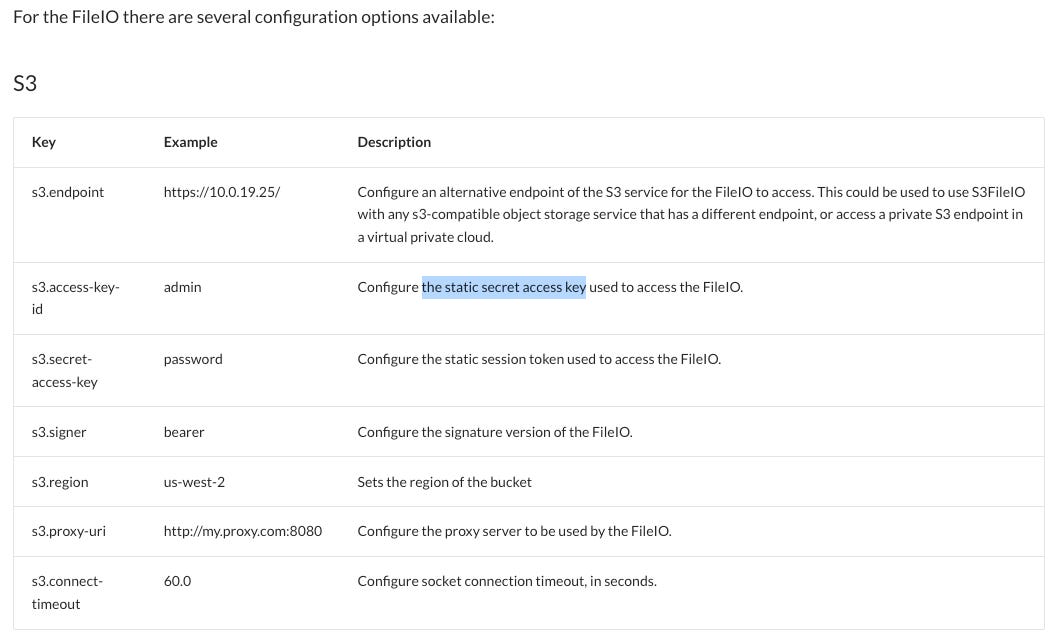
We also don’t want to use a hardcoded AWS IAM user access key to access our data as the pyiceberg documentation seems to suggest (linked by polars.scan_iceberg documentation). This goes against AWS security best practices and you will even get a warning in the AWS console when you create access keys with the intent of using them for a compute workload on AWS.
What we want
We want none of the above. What we want is:
reading from Iceberg, not Parquet
reading into a Polars dataframe, not a Pandas dataframe (and converting it)
using the credentials of an AWS IAM role, as AWS points out as a best practice for compute workloads
Doesn’t polars.scan_iceberg do what you want?
Yes and no. It reads from Iceberg and has S3 support and reads into polars directly but according to the documentation linked above you need to supply access key credentials instead of using your role’s credentials (this is bad).
The solution
If you just want the code, here it is. You should continue reading though to understand why things are the way they are. Poor support means there are some hoops to jump through and they need explanation.
import re

import boto3
import polars as pl


def get_current_role_credentials() -> dict[str, str]:
    """
    Retrieve temporary credentials for the currently used IAM role.

    Returns:
        dict: A dictionary containing the AccessKeyId, SecretAccessKey, and SessionToken.
    """
    # Create a session using the default credentials (IAM role assigned to the Glue job)
    session = boto3.Session()

    # Retrieve the credentials
    credentials = session.get_credentials()
    credentials = credentials.get_frozen_credentials()

    # Convert credentials to a dictionary
    current_credentials = {
        'AccessKeyId': credentials.access_key,
        'SecretAccessKey': credentials.secret_key,
        'SessionToken': credentials.token
    }

    return current_credentials


def get_latest_metadata_file(bucket_name: str, base_path: str) -> str:
    """
    Find the latest metadata file in the given S3 bucket and path.

    Args:
        bucket_name (str): The name of the S3 bucket.
        base_path (str): The base path within the S3 bucket.

    Returns:
        str: The key of the latest metadata file.
    """
    s3 = boto3.client('s3')

    # List all files in the base path
    response = s3.list_objects_v2(Bucket=bucket_name, Prefix=base_path)

    # Regex to match metadata files
    metadata_pattern = re.compile(r'.*\.metadata\.json')

    latest_file = None
    latest_time = None

    # Iterate through all the files in the given base path
    for obj in response.get('Contents', []):
        key = obj['Key']
        if metadata_pattern.match(key):
            # Parse the LastModified attribute
            last_modified = obj['LastModified']
            if latest_time is None or last_modified > latest_time:
                latest_file = key
                latest_time = last_modified

    return latest_file


def main():
    bucket_name = "<bucket-name>"
    base_path = "<path>/<to>/<table>/metadata/"

    # Get temporary credentials for the currently used IAM role
    credentials = get_current_role_credentials()

    # Get the latest metadata file for the Iceberg table
    latest_metadata = get_latest_metadata_file(bucket_name, base_path=base_path)

    # Supply credentials to polars and read the Iceberg table
    storage_options = {
        "s3.region": "<your-region>",
        "s3.access-key-id": credentials['AccessKeyId'],
        "s3.secret-access-key": credentials['SecretAccessKey'],
        "s3.session-token": credentials['SessionToken'],
    }

    df = pl.scan_iceberg(
        latest_metadata, storage_options=storage_options
    ).collect()

    print(df)

if __name__ == "__main__":
    main()
Why querying credentials?
Usually when running AWS compute workloads such as an AWS Glue job you are implicitly working with temporary access key credentials. You just don’t have to care about this as AWS takes care of it for you. Usually you need to remember is granting the needed permissions to the AWS IAM role running the workload.
In this case though pyiceberg (or respectively polars.scan_iceberg) wants to have the access key id and secret access key to be explicitly supplied to it. That’s why we have a rare case in which you have to call these implicit credentials your role is working with.
The pyiceberg documentation is lacking by the way. It doesn’t even mention that there is a s3.session-token to supply to the storage_options, but this part is critical. If you don’t supply a session token, you will get a permission error reading something like the following:
ClientError: An error occurred (InvalidAccessKeyId) when calling the GetObject operation: The AWS Access Key Id you provided does not exist in our records.I only found this by chance, by simply guessing that there might be an undocumented s3.session-token option and in this case I was lucky. The documentation needs to be fixed.
Why getting the latest metadata file?
Strictly speaking this isn’t necessary. You could use any valid metadata.json for your table. In my experience querying the current state of the table is by far the most common use-case though so that’s what we focus on here, but theoretically you could also use older metadata.json to make use of Iceberg’s time-traveling ability.
The polars documentation only mentions a metadata.json that you should supply as a path to the file on S3. You likely have many metadata.json files though and you will keep creating new ones as you keep updating your Iceberg table. They are used for pointing to the parquet files that hold the actual data of the table. And as you probably either already knew or guessed by now, the most recent metadata file holds the metadata for the current state of the table, which is what we want to query.
Troublehooting
Your AWS Glue Python Shell job needs access to polars and pyiceberg. You can install them as follows, by supplying the following Job parameter:
--additional-python-modules: polars, pyiceberg
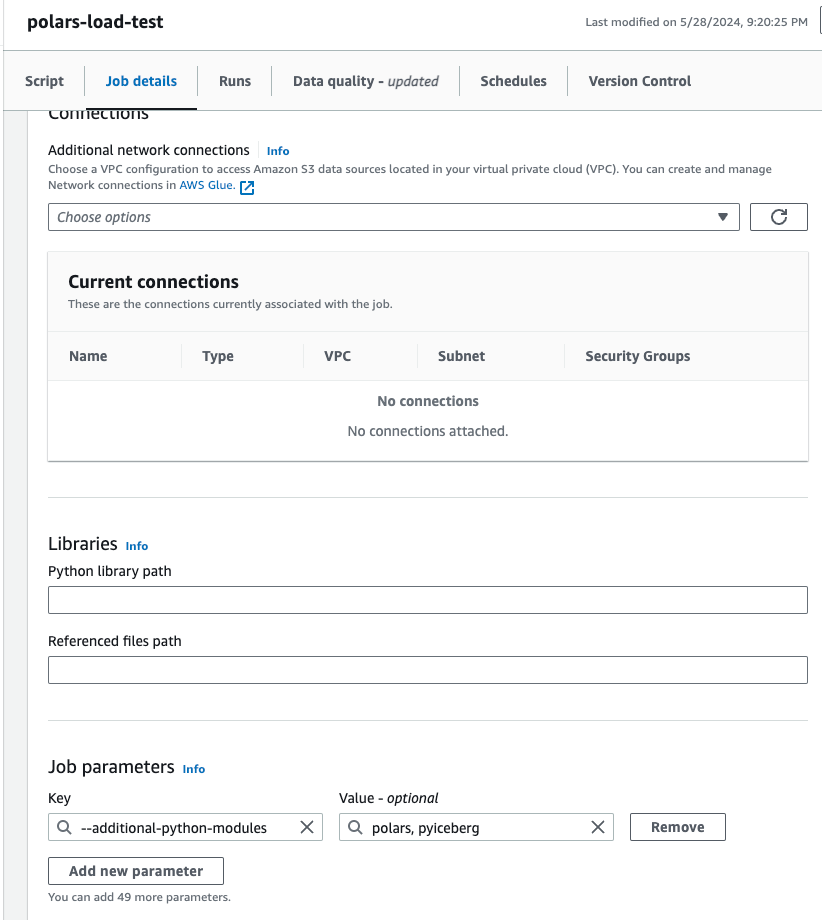
Your IAM role needs to have permission to read the S3 bucket in which your Iceberg data is stored.
Remember to change the value of
s3.regionin the above code snippet to match your S3 bucket.
Conclusion
Support for Icebreg+Polars is still lacking but for now the above code will get you working.
For the future let’s hope for two things:
Polars and pyiceberg fixing their documentation regarding
storage_optionsSomeone implementing a more convenient way of reading Iceberg tables into Polars, something like
awswrangleralready does for Pandas
Don’t forget to subscribe to receive more articles on data engineering by someone actually working in the field - packed with actionable solutions to common problems and advice on strong fundamentals.